
- Online VoIP Comparisons since 2005
- 26.5+ Million page views: Testimonials
Although problems with VoIP are not as common as traditional landline providers would have you believe, they do exist. One such problem that I have the unfortunate pleasure of encountering is intermittent or choppy audio when using my VoIP line.
With a VoIP call your voice is digitally sampled and divided into small sections. Each section is sequentially sent out over the internet embedded within an IP (Internet Protocol) Packet. The choppy or intermittent voice can come from one or more of these packets being lost, not sent or delayed in the network somewhere.
If you are having issues with intermittent audio there are a few simple things that you can do before you phone your providers customer service line.
Try and characterize the intermittent voice. Is it in one direction only? Is it when you and your family are using the internet? Typically it will be the person on the other end who can't hear you properly and you will not experience the intermittent audio.
A common cause of this is a lack of bandwidth in the uplink direction. Residential internet such as DSL and cable are asymmetrical in nature. The provider may promise 6Mbits/s, and they do deliver on their promise, however that is in the download direction i.e. to your home. In the upload direction it is likely to be much less than this. Try running a VoIP speed test when you are on the phone and experiencing problems and take a note of the bandwidth you are getting in the uplink and downlink directions. Compare it to when you are not on the phone. Do you see much variation?
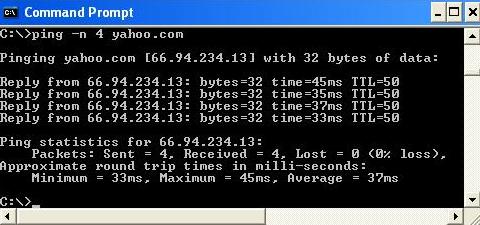
Another simple test you can do is a ping test. Open a DOS command prompt on your PC (usually you can do this by clicking on the start button and entering "cmd"). Type the following command "ping -n 100 yahoo.com" (don't type the ""). Scroll down to see a screen shot of what you would expect to see.
What you are doing with this test is sending IP packets to yahoo.com. The servers that host the yahoo website are sending a response back to your PC. The 66.94.234.13 is the IP address of the server on the yahoo side. The bytes are how many bytes are in the IP packet and the time is the round trip time for the message to be sent from your PC to Yahoo and then sent back again. Once the test has completed you get a summary of the results, the important one is the "lost" statistic, ideally this would be 0%. Any more than about 3% and the dropped packets will result in intermittent voice. Also the response time should ideally be under 100ms. Try this test a few times and see if there is any correlation between using the phone, time of day or kids home from school and streaming Netflix movies!
It's also important to check your setup and make sure you have followed the instructions your VoIP provider sent with the ATA. This is particularly crucial if you have a router. Your ATA is effectively a VoIP router, it will give your voice packets priority over the data packets from your PC. This means that your voice packets will be sent out on time and will not be delayed even if you are downloading or uploading large files. The most common set up is is to have your modem, then your ATA and then your router. For more information on this subject check our Home VoIP Setup guide.
Try the speed test and the ping tests using your PC but with the ATA removed from the setup and again try and see any correlation.
If you see a slight drop in bandwidth or one or two more dropped packets while you are on the phone then this is actually a good sign. This means that your ATA is giving priority to your phone at the expense of a few dropped packets of data. Data can be re-sent without a loss of content, unfortunately voice cannot.
These are all fairly simple tests to run and you don't necessarily have to take any actions based on the results however it will give the customer service technician you call a lot of valuable information. It may also save you running these tests while he's on the phone as he's "scripted" to ask you this. Very often the technician can change your ATA settings to use a CODEC with higher voice compression such as G.729, thus using less bandwidth and resulting in less lost packets. They may also get you to call your internet provider and have them check your connection. The above tests may also be valuable to your internet provider customer representative will no doubt ask you run them.
Often the problems associated with VoIP are problems with a users internet connection and not the actual VoIP service.
New: WhichVoIP.com now has a troubleshooting section which may help you get to the bottom of any VoIP problems you may be experiencing.
If you have had experience with troubleshooting intermittent audio issues or have ideas for other tests to try then use our comment form below to add your input for others to read.
 PREV PREVThe Best Options for Low Cost Calls |
NEXT  How do I add multiple phones to my VoIP digital phone service? |
GO TO RESIDENTIAL ARTICLE INDEX
#1 : Posted by Dan
When I ping Yahoo my packet loss is 10% and my average time is over 500ms but when I ping google.com, comcast.com, centurylink.net (my provider) I get 0% packet loss and between 25 and 70ms times. What does this mean? Also, when I do your speed test, it always shows my upload speed much lower, between 1 and 8mbps, than centurylink or speedtest.net's tests. My plan is 40/20 and they usually show me at that speed. Why does your test not? I've done all these tests many times. Thanks!
-> Response: Dan there are a lot of variables in the tests which can explain the variations though I would not expect such a large variance with Yahoo to be honest. Do you always see this 10% loss to yahoo (maybe just a weird blip)?
For the speed test again there are variations but it is usually fairly accurate when I do this for my Comcast connection and I have tested this over many connections. However, I could see centurylink showing the fastest possible results if you use them and are using their test - you will likely get super high priority through their servers :-)
Are you having VoIP issues by the way as regardless of your actual speed, you have a fast connection so that is unlikely to be an issue. Did you check the other results (packet loss, mos and jitter) in our voip test as they are better indications for voice quality?
-> UPDATE: Enabled QoS on router and now 0% packet loss on our voip test. However note that yahoo consistently gives bad packet loss rates for pings. Confirmed by WhichVoIP. Suggest using Google for this as Yahoo servers seem to have issues (perhaps deliberately!).
© 2004-2026 WhichVoIP.com